Nova's ArtMake · Merge · Color
Make

Hi

Mix parts to make a character. Every part is an original drawing, made just for this app.

Parts

New character, not saved yet.

Merge two characters

Pick two of your saved characters. The new one takes some parts from each. Tap "from" on a part to swap which one it comes from.
Pick a color, then tap any part of the drawing.

Print it or keep it

The printout fills a letter-size page. On iPhone, the print screen can also save it as a PDF (tap Share, then Save to Files).

Building it together

Ideas

This app is still being made. Answer these and ask for anything. Joshua sees it right away.

Want something changed or added?

Admin

Access

Only Joshua sees this page.

Changes made in this app

None yet.

Help

Using Nova's Art

Put it on your home screen so it opens like an app.

iPhone (Safari)

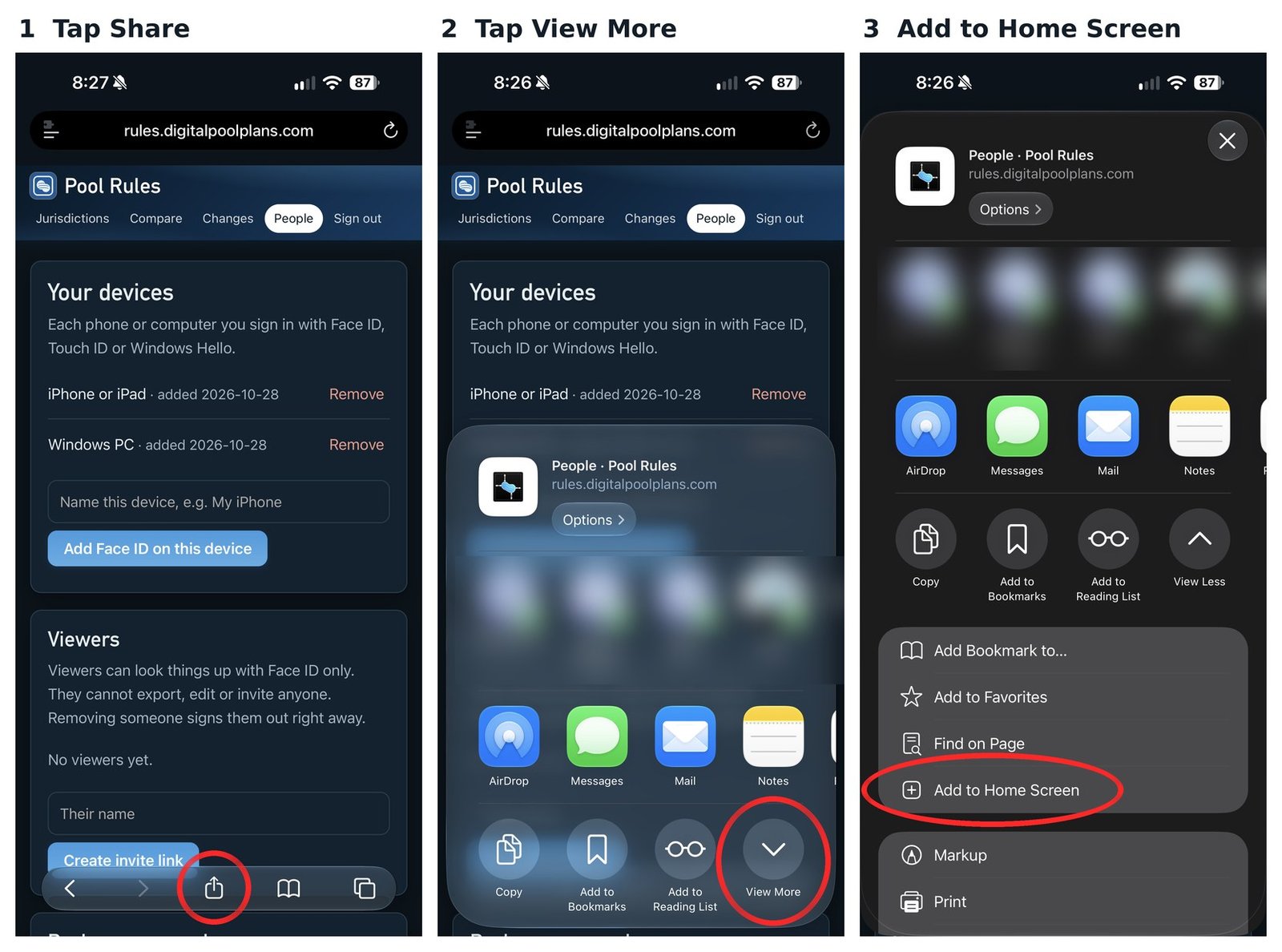
Tap the picture to see it full size.

Three iPhone screens: tap the Share button at the bottom, tap View More, then tap Add to Home Screen
  1. Open Nova's Art in Safari and tap the Share button at the bottom (the square with the arrow pointing up).
  2. Tap View More.
  3. Tap Add to Home Screen, then tap Add.

The pictures are from another of Joshua's apps. The steps are the same for Nova's Art.

Android

In Chrome: tap the menu (three dots, top right), then Add to home screen or Install app.

In Samsung Internet: tap the menu, then Add page to, then Home screen.

When Nova's Art is updated

When the app is changed, a bar shows up at the top: "Nova's Art was updated. Tap to refresh." Tap it to get the newest version. Nothing you saved is lost.

Signing in

Face ID or fingerprint sign-in is set up once, from a one-time setup link. After that there's nothing to remember.

New phone, or Face ID stopped working? Ask for a new setup link.

Preferences

Settings

Saved on this phone.

Accent color

Brightness

Text size

Nova's Art is part of Family Endeavors. Built by Joshua.